Hello,
I set an AOI on the ASF portal and search for S1 SLC products with a certain relative orbit number (RON).
I correctly see all images available with that RON covering the AOI, however as soon as I press the SBAS bottom pairs form also with images outside the AOI. Is not a metter of non existing images, but apparently a mismatch in the slice number. By looking in more detail I noticed that the problem is always with S1C, or in the past with S1B. In particular it's creating image pairs (interferogram) between a correctly located S1A image and the S1C image slice above or below the correct one (which covers the AOI).
If I try to re-enter the AOI, I see that some pairs are neglected, but when I submit the process to HyP3 I receive all the interferograms involving not covering the AOI (i.e., using the wrong slice of the S1C images, above or below the one correctly covering my AOI).
Anything change if I go from a polygonal AOI to a point AOI, or if I reduce the size... is like for S1C is not checking the superimposition or the slice numbers are different from the correspondent S1A ones and this is not taken into account.
I'm not finding any way to solve this issue. Has anyone got into this before?
Sentinel 1C SBAS search - wrong image location
-
alberto_mariani
- Posts: 2
- Joined: Thu Jun 04, 2026 8:14 am America/New_York
-
alberto_mariani
- Posts: 2
- Joined: Thu Jun 04, 2026 8:14 am America/New_York
Re: Sentinel 1C SBAS search - wrong image location
I attach a screenshot of my search in which you can see the AOI (yellow dot) and the two image S1A and S1C location. S1C is not covering the AOI (it should be covered by the slice above!)
- Attachments
-
- Example of mismatch in image pair
-
ASF - bhauer
- User Services

- Posts: 63
- Joined: Thu Dec 12, 2024 5:54 pm America/New_York
Re: Sentinel 1C SBAS search - wrong image location
Hello Alberto,
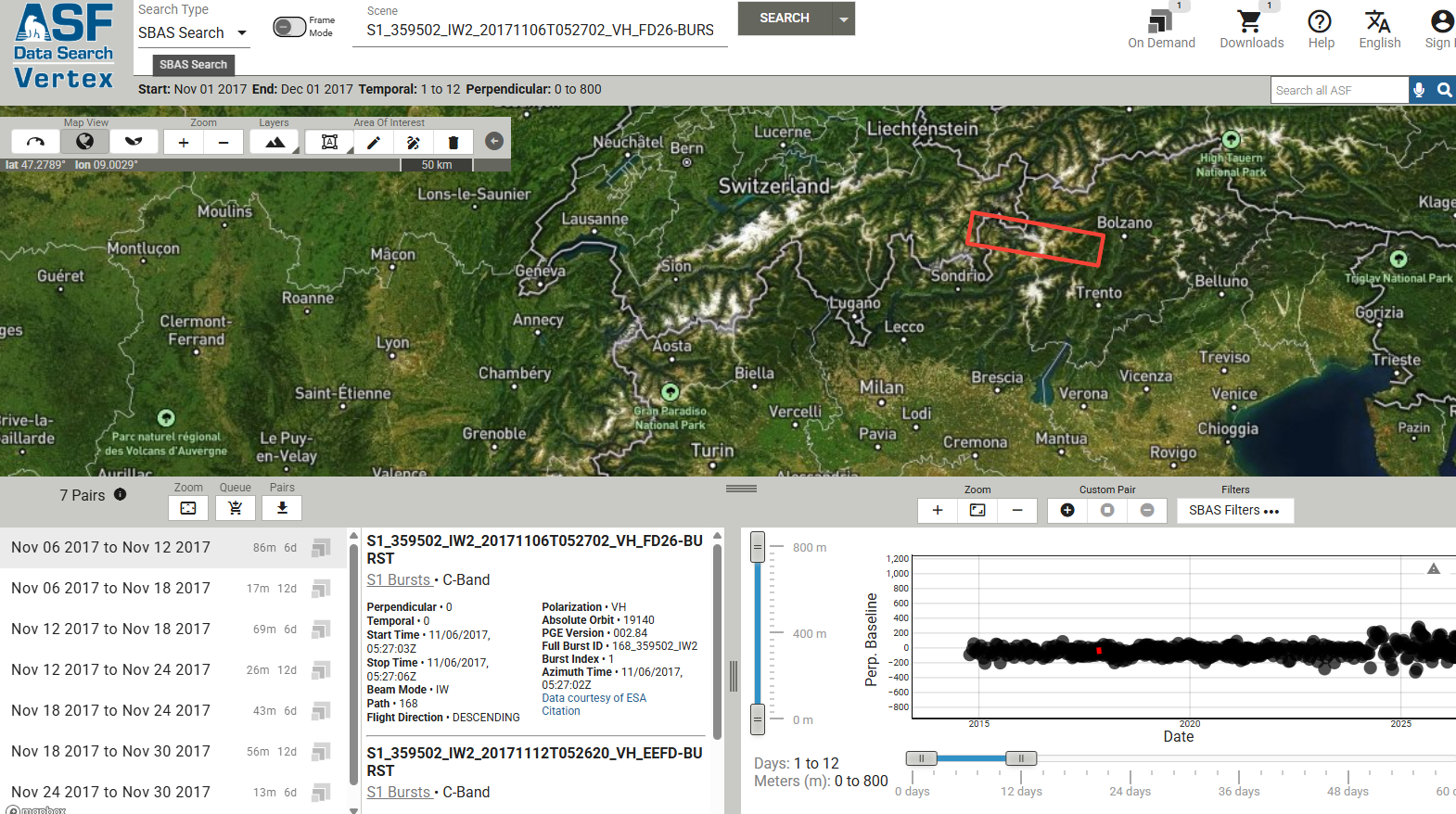
I will report your observations to our SBAS team. In the meantime, since your search seems fairly focused (point search), I suggest using Sentinel-1 bursts rather than full frames. While S-1 frames (slices) can "drift" over a location on the ground over time because of the way acquisition swaths are sliced, bursts line up precisely over time over the same location on the ground. The screenshot I've included shows the results of an SBAS search over your AOI using bursts instead of frames. You can see how closely aligned the stack is.
Another advantage of using bursts is that the area is smaller, thereby reducing both the file size and the processing time and resources required.
Information on working with Sentinel-1 burst products can be found in this StoryMap. Information on using bursts with On Demand InSAR processing can be found in the HyP3 User Guide.
I will report your observations to our SBAS team. In the meantime, since your search seems fairly focused (point search), I suggest using Sentinel-1 bursts rather than full frames. While S-1 frames (slices) can "drift" over a location on the ground over time because of the way acquisition swaths are sliced, bursts line up precisely over time over the same location on the ground. The screenshot I've included shows the results of an SBAS search over your AOI using bursts instead of frames. You can see how closely aligned the stack is.
Another advantage of using bursts is that the area is smaller, thereby reducing both the file size and the processing time and resources required.
Information on working with Sentinel-1 burst products can be found in this StoryMap. Information on using bursts with On Demand InSAR processing can be found in the HyP3 User Guide.